
TL;DR

Get bike and ride gear delivered free — and shop member deals
- Fast, free delivery on millions of items
- Access to Prime Big Deal Days deals on October 6–7
- Prime Video, Amazon Music and more included
Building your own AI workstation used to be cheaper, but recent hardware price spikes and bulk buying have closed that gap. Choosing depends on your technical skills, time, and whether you want a ready-to-go system or tailored performance.
Imagine sitting at your desk, staring at that sleek AI workstation. You’ve got the power to train models, run inference, or explore deep learning—yet the question looms: should you build it yourself or buy a prebuilt system? For years, the answer was straightforward: build for savings, buy to save time. But in 2026, that rule no longer holds.
The rising prices of GPUs, RAM, and SSDs—thanks to global shortages and AI demand—have flipped the script. Now, many prebuilt vendors buy components in bulk, locking in lower prices and offering systems that match or beat DIY costs. So, your decision is no longer just about dollars; it’s about control, support, and how you want to work with your hardware.
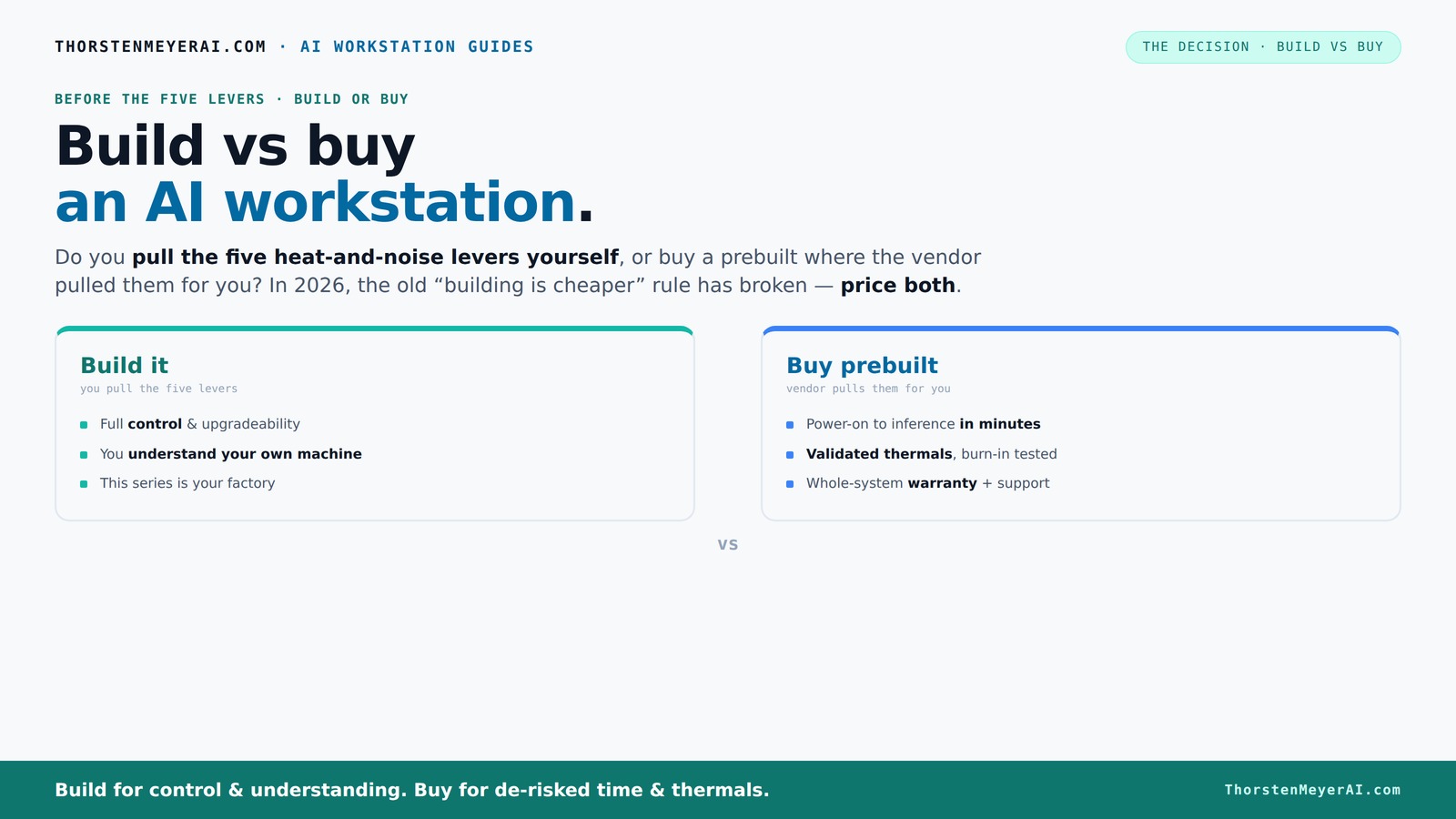
Build vs buy
an AI workstation.
The real question behind this whole series: do you pull the five heat-and-noise levers yourself, or buy a prebuilt where the vendor pulled them for you? And in 2026, the old “building is cheaper” rule has broken. Match your situation in Part 3.
Key Takeaways
- Recent hardware shortages and bulk buying have made prebuilt AI workstations often as affordable as DIY, shifting the traditional cost advantage.
- Thermal management and noise control are crucial for high-performance AI systems; prebuilt vendors validate and optimize these at the factory, saving you effort.
- Your decision hinges on whether you want full control and customization (build) or convenience and support (buy).
- Complex multi-GPU setups benefit from prebuilt systems with validated cooling and power, reducing your risk of thermal throttling.
- Always compare current prices for your exact configuration — don’t assume DIY is cheaper without a fresh quote.
high performance AI workstation prebuilt
As an affiliate, we earn on qualifying purchases.
As an affiliate, we earn on qualifying purchases.
Why the 'Build Always Cheaper' Myth Is Dead in 2026
Building your own AI workstation used to be a straightforward way to cut costs. The logic was simple: buy components separately, assemble yourself, and save on markup. However, recent market shifts have dramatically altered this equation. The surge in hardware prices—particularly for GPUs, RAM, and SSDs—has increased the cost of DIY builds, sometimes by 20-50% over 2023 levels. This means that the traditional cost advantage has eroded or even disappeared.
Moreover, the global shortages and high demand for AI hardware have led to inflated prices. For example, the NVIDIA RTX 4090, which once hovered around $1,600, now often sells for over $2,000 due to scarcity. Meanwhile, large vendors like Lambda and BIZON leverage their buying power to secure bulk discounts, allowing them to offer prebuilt systems that are often competitively priced—sometimes even cheaper than a DIY equivalent.
These trends imply that the decision to build or buy now hinges less on raw cost and more on factors like time, support, and customization. The once-clear savings from building a custom system are now muddled by the complexities of market fluctuations and component availability. Therefore, a deep understanding of current prices and your own needs is essential to making an informed choice.
customizable AI GPU workstation build
As an affiliate, we earn on qualifying purchases.
As an affiliate, we earn on qualifying purchases.
The Five Levers of a High-Power AI Workstation — Who Pulls Them?
Think of your AI rig as a furnace that needs to stay cool and quiet. The five levers are: undervolting the GPU, matching the right cooler, optimizing airflow, tuning fans, and placement. When you build yourself, you pull all these levers — tuning every part for your workload, which can lead to significant gains in performance, noise reduction, and energy efficiency. For instance, undervolting reduces power consumption and heat, allowing for quieter operation and potentially longer hardware lifespan. Proper airflow and cooling solutions can prevent thermal throttling during intensive training tasks, ensuring consistent performance.
Buy a prebuilt? The vendor pulls these levers for you. Companies like Puget Systems or Lambda conduct extensive thermal testing, validate cooling solutions, and often include advanced features like water-cooling or specialized airflow setups. BIZON, for example, claims systems with "up to 30% lower noise and temperature" because they engineer and validate the thermal setup at the factory, eliminating trial-and-error for the end-user.
The core tradeoff here is control versus convenience. Building your own system allows you to fine-tune thermal management to your exact workload and acoustic preferences, but requires research, testing, and ongoing adjustments. Prebuilt systems, on the other hand, come pre-optimized, saving you time and reducing the risk of thermal issues, but at a premium and with less customization flexibility. Your choice depends on whether you enjoy tinkering or prefer a plug-and-play approach.
professional deep learning workstation
As an affiliate, we earn on qualifying purchases.
As an affiliate, we earn on qualifying purchases.
When Buying Prebuilt Makes Sense — Save Time & Reduce Risk
If your time is valuable and you prefer a hassle-free setup, a prebuilt AI workstation offers compelling advantages beyond mere convenience. These systems arrive ready to use—OS, AI frameworks, drivers, and all—so you can start training models almost immediately. This rapid deployment minimizes delays and allows you to focus on your projects rather than troubleshooting hardware or software issues.
Additionally, prebuilt systems are extensively tested for thermal stability and reliability. Manufacturers like Lambda conduct burn-in tests lasting 24–48 hours, ensuring components are stable under load before shipping. They also include warranties that cover hardware failures, reducing your risk of costly downtime during critical training runs. For complex multi-GPU configurations, vendors often incorporate validated cooling solutions, which are difficult and time-consuming to set up correctly on your own. This reduces the likelihood of thermal throttling or hardware failure, especially during long training sessions or intensive inference workloads.
In essence, prebuilt systems are a strategic choice for those who prioritize reliability, time savings, and support—particularly when deploying sophisticated or multi-GPU setups that require expert thermal engineering. The upfront premium often offsets the potential costs and frustrations of DIY troubleshooting, making prebuilt the smarter choice for many professional and serious hobbyist users.
As an affiliate, we earn on qualifying purchases.
When Building Your Own AI System Still Pays Off
If you enjoy hardware tinkering or want full control over every component, building remains appealing. You can select a quiet GPU like the RTX 4080 or RTX 4090, undervolt it to reduce noise and power consumption, and optimize airflow within your custom case. This level of control allows you to tailor your system precisely to your needs, whether it's prioritizing silence, thermal performance, or upgradeability.
For example, hobbyists, students, or those with limited budgets but ample time can benefit from DIY. They can stretch their dollar further by choosing components that match their specific workload, and learn valuable skills along the way. Troubleshooting, upgrades, and maintenance become part of the learning process, which can be rewarding and empowering. Resources like guides on undervolting GPUs or designing quiet systems help you achieve professional-level tuning without expensive tools.
While building requires time and effort, it offers the flexibility to upgrade individual parts over time, adapt to evolving needs, and gain a deeper understanding of your hardware. This approach is ideal if you enjoy hands-on work, want maximum customization, or aim to develop technical skills that can pay off in future projects or careers.
Comparison Table: Build vs Buy — Which Fits Your Needs?
| Feature | Build It Yourself | Buy Prebuilt |
|---|---|---|
| Cost | Potentially cheaper, but depends on hardware prices and your ability to find deals. However, market fluctuations may negate savings. | Often similar or slightly higher, due to markup, but includes the value of support and warranty. |
| Time & Effort | Several hours to days assembling, troubleshooting, and tuning. Requires patience and technical skill, but offers learning opportunities. | Minutes to hours, mostly plug-and-play. Less time-consuming but less control over internal components. |
| Support & Warranty | Component warranties cover individual parts, but no single point of support for the entire system. Troubleshooting can be time-consuming. | Full system warranty and support included, reducing downtime and stress if issues arise. |
| Customization | Complete control over parts, upgrades, and configurations. Enables tailored solutions for specific workloads or noise levels. | Limited to vendor options; upgrades may be restricted or require professional service, limiting flexibility. |
| Thermal Tuning | You do it—adjust fans, undervolt, mod cooling solutions. This can optimize performance but requires expertise. | Vendor handles thermal engineering, providing pre-validated cooling solutions that minimize thermal issues. |
| Upgrade Flexibility | High—swap parts, add components, and upgrade as needed, often at minimal cost. | Variable—depends on design and vendor support; some systems are modular, others less so. |
Frequently Asked Questions
Is it actually cheaper to build my own AI workstation in 2026?
Not necessarily. Due to component shortages and bulk buying, prebuilt systems often match or beat DIY prices for similar specs. Always compare prices for your exact configuration before deciding.What GPU should I choose for AI workloads?
NVIDIA’s RTX 40 series and data center GPUs like the A100 or H100 are industry standards. Consider your workload—training or inference—and budget to pick the best fit.Can I upgrade a prebuilt AI workstation later?
It depends on the model. High-end, modular prebuilt systems often allow upgrades, but some compact or integrated designs may have limited options. Check with the manufacturer.How long will my AI workstation last?
Typically 3–5 years, depending on hardware upgrades and evolving software requirements. Regular upgrades can extend its lifespan.Are prebuilt AI workstations worth the extra cost?
For those valuing immediate deployment, warranty, and support, the premium is often justified. If you enjoy tinkering, building might still be more satisfying.Conclusion
In 2026, your choice between building and buying isn’t just about saving a few dollars. It’s about how much control, support, and effort you want to invest. With hardware prices stabilizing and prebuilt options offering top-tier performance, the decision now leans toward what suits your workflow best.
Remember: a well-tuned machine—whether DIY or prebuilt—can be the difference between bottlenecked training and seamless performance. So pick the path that aligns with your skills, needs, and future plans. Your AI journey starts with the right hardware—make it count.
Fall Picks
fall essentials
As an affiliate, we earn on qualifying purchases.