
TL;DR
Moving your rig into a closet or remote room is the most effective way to reduce noise. Proper ventilation and placement are key—foam alone won’t solve low-frequency hums or heat buildup. A well-planned ‘rig in the closet’ keeps your space quiet and cool without sacrificing performance.
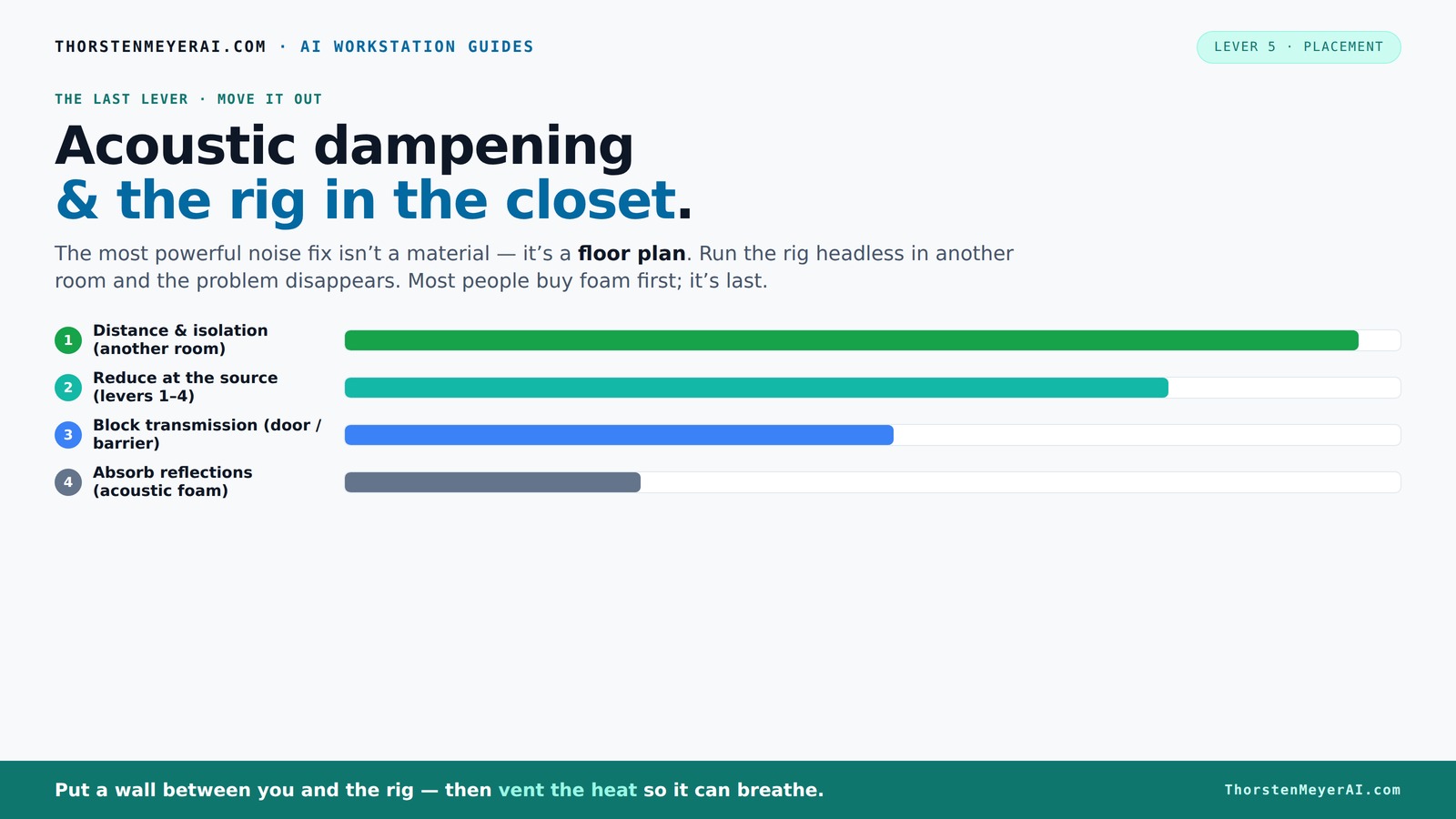
Acoustic dampening
& the rig in the closet.
The most powerful noise fix isn’t a material — it’s a floor plan. A rig you can’t hear because it’s in another room beats any amount of foam. Tap the approaches in Part 1 to see what actually works.
(another room)
(levers 1–4)
(door / barrier)
(acoustic foam)
Contain the noise, not the heat
Key Takeaways
- Moving your rig into another room or closet reduces noise more effectively than any foam panel.
- Proper ventilation is essential—sealed closets trap heat, causing throttling and hardware damage. For more details, check out the how to reduce heat and noise in an AI workstation.
- Use a combination of damping materials, decoupling mounts, and strategic placement for best sound control.
- Treat reflection points and corners in small spaces to improve sound clarity without adding clutter.
- DIY solutions like blankets and rubber feet can make a big difference on a budget.
soundproof closet for audio workstation
As an affiliate, we earn on qualifying purchases.
As an affiliate, we earn on qualifying purchases.
Why Moving Your Rig Is the Biggest Noise Hack
The best way to cut noise is to put distance between you and the source. A rig in another room, basement, or closet can be silent to your ears, even if it’s running at full throttle. Think of it like talking to someone across a field versus shouting in a hallway.
By physically relocating your equipment, you reduce the direct transfer of vibration and airborne noise that travels through walls and floors. This move often results in a significant reduction in perceived noise, making your workspace more comfortable without expensive soundproofing. It also minimizes the need for complex acoustic treatments in your immediate area, saving time and money.
For AI workstations, you don’t need the rig next to you. Instead, connect remotely over a wired or strong wireless network. Your laptop stays quiet, your rig roars in another room, and your workflow remains seamless. This setup not only reduces noise but also allows better thermal management, since the rig is placed in a more ventilated environment. This tradeoff — remote access versus proximity — often favors remote placement for noise-sensitive work.
For example, I set up my GPU server in a spare closet. Now, I SSH into it, and it’s whisper-quiet in my office. The noise? It’s in the next room, out of sight and out of earshot. The same applies whether you’re running a deep learning rig or a high-end audio workstation. The key is understanding that physical separation often yields the most noticeable noise reduction, especially when combined with other dampening methods.

Focusound 52 Pack Acoustic Foam Panels 1" x 12" x 12" Sound Proof Foam Panles Soundproofing Noise Cancelling Wedge Panels for Home Office Recoding Studio with 300PCS Double-Side Adhesive
- Soundproofing Design: Triangular grooves for noise absorption
- Includes Adhesive Tape: 300pcs double-sided adhesive for easy installation
- Easy Shape Recovery: Reforms after soaking in water
As an affiliate, we earn on qualifying purchases.
As an affiliate, we earn on qualifying purchases.
The "Rig in the Closet" Setup — How to Do It Without Overheating
Placing a high-powered rig in a closet sounds perfect—until it isn’t. Sealing it tight traps heat, causing temperatures to soar. A GPU can produce 600W of heat under load, and without proper airflow, this heat will build up rapidly. Overheating isn’t just about discomfort; it’s a serious threat to hardware longevity and performance. Throttling occurs when components reduce their speed to prevent damage, which defeats the purpose of high-performance setups.
The key? Ventilation. You need active airflow—think exhaust fans, vents, or ducting. Even a small passive vent can help, but a quiet exhaust fan is better. For serious setups, consider a purpose-built soundproof cabinet with ducted airflow and temperature sensors. These units balance noise dampening with cooling, ensuring your rig stays within safe temperature ranges while remaining quiet. The tradeoff is complexity and cost, but it’s essential for maintaining hardware health in confined spaces.
Remember, neglecting ventilation can lead to thermal throttling, increased fan noise, and ultimately hardware failure. Properly designed airflow pathways prevent heat buildup, allowing your setup to operate efficiently and quietly. For more details, check out the [how to reduce heat and noise in an AI workstation](https://thorstenmeyerai.com/reduce-heat-noise-ai-workstation/). The bottom line: effective ventilation is not optional — it’s critical for a safe, quiet, high-performance rig.

be quiet! Silent Base 802 Window ATX Midi Tower PC Case| 3 Pre-Installed Pure Wings 2 Fans | Sound Insulated | Tempered Glass Window | Black | BGW39
- Top cover and front panel: Interchangeable for airflow or silence
- Pre-installed fans: Three Pure Wings 2 140mm fans
- Noise insulation: Extra thick insulation mats
As an affiliate, we earn on qualifying purchases.
As an affiliate, we earn on qualifying purchases.
Acoustic Dampening 101: Absorb, Block, Diffuse
Acoustic dampening isn’t just about foam on the walls. It’s about understanding how sound travels and how to stop it effectively. Learn more in our guide on acoustic dampening. There are two main types: airborne and structure-borne noise. Each needs a different fix.
Airborne noise travels through the air—fans, hums, high-frequency chatter. Acoustic foam absorbs mid and high frequencies, reducing echo within the room. A solid barrier—like a door or dense panel—blocks sound from escaping into other spaces. These methods are crucial because airborne noise directly affects your environment's comfort and can disturb neighbors or others nearby. Proper treatment reduces this noise, but be aware of the limitations: foam alone often isn’t enough for low-frequency sounds.
Structure-borne noise moves through the physical structure—vibrations from a running GPU or hard drives. Rubber feet, anti-vibration pads, and decoupling mounts cut down this low-frequency hum. These vibrations can travel through desks, stands, and walls, amplifying noise and potentially causing mechanical stress. Using vibration isolation materials can significantly reduce this type of noise, but it’s a tradeoff: added damping can sometimes slightly impact airflow or accessibility. Placing your tower on rubber feet or decoupling mounts isn’t just about noise; it also prolongs hardware lifespan by reducing mechanical stress.
As an affiliate, we earn on qualifying purchases.
How to Properly Place Acoustic Treatment for Best Results
Effective placement of acoustic panels transforms a room from echoey and unbalanced to a controlled, natural-sounding space. For tips on placement, see this guide on acoustic treatment placement. The goal is to minimize reflections that cause muddiness and to absorb standing waves that create boomy spots. Start by identifying reflection points—places where sound bounces directly from your speakers or equipment to your ears.
Use a mirror on the wall to find these points: sit in your usual listening position, and have a friend move a mirror along the wall. Where you see the speakers reflected is where you should place panels. This ensures sound waves are absorbed before bouncing back into your ears, improving clarity and imaging.
In small spaces like closets, focus on treating the door, walls, and ceiling, as these are the primary surfaces where sound reflections occur. For more on acoustic treatment, visit this resource. Bass traps in corners absorb low-end resonances, preventing boomy sound and standing waves that can distort audio clarity. Check out this article on acoustic treatment for more details. Diffusers scatter sound waves, making the room sound more natural and less 'boxy.' Proper placement of these elements, based on room dimensions and reflection points, can dramatically improve sound quality without cluttering the space.
For example, I installed foam panels at reflection points and bass traps in the corners of my closet studio. This targeted approach maximizes effectiveness, resulting in clearer audio, less echo, and a more balanced sound profile — all within a tight space. The key is understanding how sound interacts with your environment and strategically placing treatments where they matter most.
The Best Materials for DIY Acoustic Dampening on a Budget
High-end acoustic panels can be expensive. But you don’t need to spend a fortune. Household items and affordable materials can do a good job if placed correctly. The key is understanding that effective damping depends on placement, coverage, and material properties—thick, porous, or fibrous materials tend to absorb sound better.
Some effective DIY options include:
- Thick blankets or quilts—especially around reflection points, doors, and corners. They absorb mid and high frequencies and are easy to install and remove.
- Egg crate foam—cheap and easy to find online, it’s good for treating high-frequency reflections but less effective on bass.
- Carpet or rugs—great for absorbing mid and low frequencies, especially in the floor and wall areas where sound tends to bounce.
- Mineral wool or fiberglass panels—can be homemade or bought at hardware stores. These materials are highly effective for broadband absorption but require careful handling due to irritants.
For example, I used old mattress toppers and blankets to dampen my closet studio. While not as perfect as professional panels, these materials significantly reduced echo and background noise, especially when placed at reflection points and corners. The tradeoff? They’re inexpensive and flexible, making them ideal for small budgets. Remember, the most critical factor is placement—cover reflective surfaces and problem areas thoroughly for best results.
Pro Tips for Keeping Your Closet Rig Cool and Quiet
Running a powerful rig in a small, enclosed space means managing heat and noise together. Here are some practical tips:
- Install a quiet exhaust fan with temperature control. This ensures continuous airflow and prevents heat buildup without adding excessive noise.
- Use ducting to direct hot air outside or into a vented area, avoiding recirculation that can trap heat.
- Place rubber or foam pads under the tower to decouple vibrations from the surface, reducing transmitted noise and mechanical stress.
- Set up a fan or duct system to circulate air without introducing noise—using duct silencers or acoustic baffles can help.
- Monitor temperatures regularly with a simple sensor or software alert—keep GPU and CPU temps below 80°C to prevent throttling and hardware damage.
For more on cooling, check out [liquid vs. air cooling for inference rigs](https://thorstenmeyerai.com/liquid-vs-air-cooling-inference-rig/). Remember: heat kills performance faster than noise ever will, so investing in proper cooling solutions is essential for maintaining both performance and longevity of your hardware in a confined space.
Frequently Asked Questions
Can I put my workstation in a closet without overheating?
Yes. The key is proper ventilation. Use exhaust fans, ducting, or vent openings to keep hot air moving out. Avoid sealing the closet completely; instead, create a controlled airflow system that cools while dampening noise. Properly designed airflow pathways prevent heat buildup, ensuring your hardware runs efficiently without thermal issues that could cause throttling or damage.
What materials are best for DIY soundproofing in a small room?
Thick blankets, egg crate foam, carpets, and mineral wool panels are budget-friendly options. Their effectiveness depends on strategic placement—cover reflection points, corners, and seams where sound tends to bounce or transmit. Proper placement and coverage are more important than brand or material quality, as they directly influence how much sound is absorbed or blocked, especially at mid and high frequencies.
How do I prevent my closet "rig" from overheating?
Install an active exhaust system with a thermostat, duct hot air outside, and keep airflow continuous. Regularly monitor temperatures with sensors or software alerts—aim for GPU temps below 80°C. Effective ventilation prevents heat from accumulating, which not only maintains performance but also avoids hardware throttling and potential failure. Good airflow design is a critical factor in safely operating a compact, enclosed setup.
Is it worth converting a closet into a studio?
Absolutely, if you manage ventilation and acoustic treatment properly. It’s a cost-effective way to create a quiet, dedicated workspace without needing a separate room. Proper airflow, soundproofing, and comfort considerations are essential. When planned carefully, a closet studio can offer excellent sound isolation and thermal management, making it a practical solution for many home setups.
Conclusion
Sometimes, the best way to silence your high-powered rig isn’t more foam or soundproofing—it’s simply moving it out of your immediate space. A closet or another room, combined with proper ventilation, transforms a noisy, hot machine into a silent, cool workhorse. Think of it as giving your setup the quiet, efficient environment it deserves.
Before you spend another dollar on foam, consider where your rig lives. A smart placement can save you money, headaches, and even extend your hardware’s lifespan. Your workspace will thank you—and so will your ears.