To safely remove grime and corrosion from your battery contacts, first turn off your device and remove the batteries. Use gloves and eye protection if needed. Gently scrub the contacts with a toothbrush dipped in a baking soda-water mixture or a contact cleaner. Wipe it clean with a cloth or cotton swab soaked in isopropyl alcohol, then dry thoroughly. Following these steps helps keep your device running smoothly, and you’ll discover more tips as you continue.

Get bike and ride gear delivered free with Prime
- Fast, free delivery on millions of items
- Prime Video, Amazon Music and more included
- Member-only deals all year
Key Takeaways
- Power off devices and remove batteries before cleaning to prevent electrical hazards.
- Use a toothbrush with baking soda-water or contact cleaner to gently scrub corrosion without damaging contacts.
- Wipe contacts with a cloth or cotton swab dampened with isopropyl alcohol and dry thoroughly before reassembling.
- Wear gloves and eye protection if corrosion is severe to ensure safety during cleaning.
- Regularly inspect and clean contacts in humid environments to prevent buildup and prolong battery life.
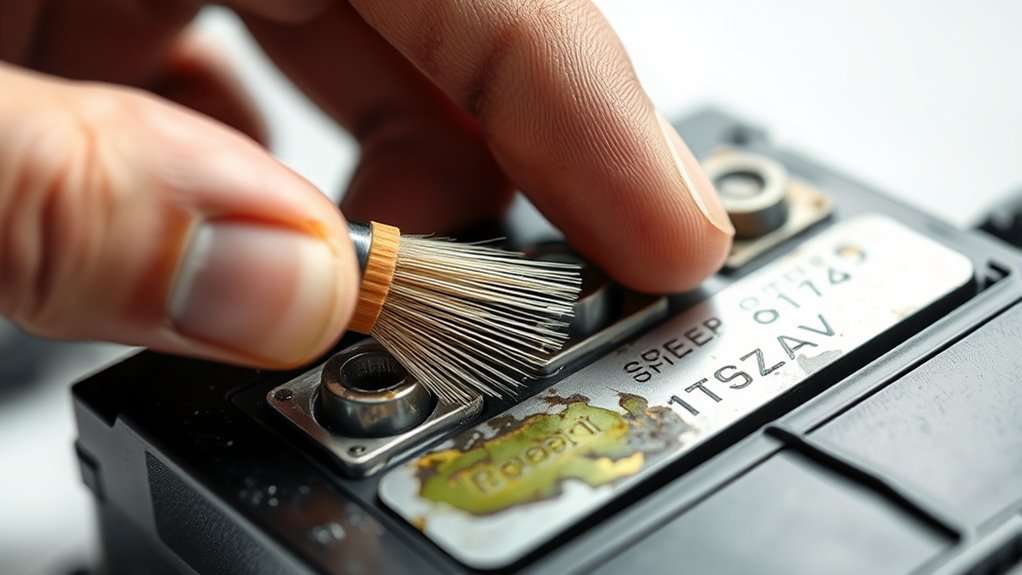
Over time, dirt, corrosion, and debris can build up on battery contacts, leading to poor electrical connections and device malfunctions. This buildup hampers the flow of electricity, making your devices less reliable or completely unresponsive. That’s why proper battery maintenance is essential for ensuring your devices work smoothly. One of the most effective ways to maintain good contact points is by cleaning them regularly and preventing corrosion from forming in the first place. Corrosion prevention starts with simple habits, like keeping contacts dry and free from dirt and grime. Using protective coatings or dielectric grease can also create a barrier against moisture and corrosion, extending the lifespan of your batteries and contacts. Regular inspection and understanding of electrical connections are key to maintaining device performance. When you notice signs of corrosion—such as white, powdery deposits or a bluish-green tint—you should act promptly. Cleaning the contacts isn’t complicated, but it requires care to avoid damaging the sensitive components. First, power down the device and remove the batteries if possible. Wearing gloves and eye protection is a good idea, especially if corrosion is severe. To clean the contacts, you can use a small brush, such as a toothbrush, dipped in a mixture of baking soda and water, or a specialized contact cleaner. Gently scrub the corrosion away, ensuring you don’t push debris further into the contact points. After cleaning, wipe the contacts with a clean cloth or cotton swab dampened with isopropyl alcohol to remove any residual residue. Let everything dry completely before reinserting the batteries or powering up the device again. Preventing future corrosion is just as important as cleaning existing buildup. Consistent battery maintenance involves regularly inspecting contacts, especially in environments with high humidity or temperature fluctuations. Store your devices in cool, dry places, and avoid leaving batteries in them for extended periods if you’re not using the device regularly. If your device is frequently exposed to moisture or dust, consider investing in sealed or water-resistant models, or applying a protective coating designed for electronics. These steps help keep corrosion at bay and ensure reliable performance over time. Remember, the key to long-lasting battery contacts is a combination of regular inspection, gentle cleaning, and proactive corrosion prevention. By taking these simple measures, you’ll maintain excellent electrical connections and extend the lifespan of your batteries and devices, saving you time and money in the long run.
As an affiliate, we earn on qualifying purchases.
Frequently Asked Questions
Can Battery Contact Cleaning Be Done Without Removing the Battery?
Yes, you can clean battery contacts without removing the battery. You should first turn off the device, then inspect the contacts for grime or corrosion. Use a small brush or a cotton swab dipped in a contact cleaner or vinegar to carefully cleanse the contacts. Avoid excessive moisture, and make certain the contacts are dry before turning the device back on. Battery removal isn’t necessary unless the corrosion is severe or cleaning is difficult.
Are There Eco-Friendly Cleaning Solutions for Battery Contacts?
Yes, eco-friendly cleaning solutions for battery contacts are like a breath of fresh air for your tech. You can use natural solutions like diluted vinegar, baking soda paste, or lemon juice, which are gentle yet effective. These natural solutions break down grime and corrosion without harming the environment. Using eco-friendly cleaning not only protects your devices but also keeps our planet healthy, making your maintenance routine more sustainable and safe.
How Often Should Battery Contacts Be Cleaned?
You should clean your battery contacts whenever you notice contact corrosion or grime buildup, typically every few months for regular battery maintenance. Regular cleaning prevents poor connections, extends battery life, and guarantees peak performance. Keep an eye out for corrosion or dirt, especially if your device’s performance drops or you see visible grime. Doing this regularly helps you avoid costly repairs and keeps your batteries working smoothly and safely.
Is It Safe to Use Household Items for Cleaning Contacts?
Using household items for cleaning battery contacts isn’t safe because of household item risks and DIY cleaning dangers. Items like vinegar or baking soda can cause unintended damage or corrosion if used improperly. Instead, you should use proper cleaning tools and solutions designed for electronics to avoid risking damage to your device or harming yourself. Always follow safety guidelines and consult professional advice for effective, safe cleaning.
Can Cleaning Damage Sensitive Electronic Components?
Did you know that improper cleaning causes over 30% of electronic failures? You should be cautious because cleaning risks can damage sensitive electronic components if you use harsh chemicals or excessive force. Even small missteps, like using abrasive materials, can harm delicate parts. To avoid this, always use proper cleaning methods and gentle tools, ensuring you protect the electronic sensitivity of your devices while effectively removing grime and corrosion.
corrosion removal tools for electronics
As an affiliate, we earn on qualifying purchases.
As an affiliate, we earn on qualifying purchases.
Conclusion
Now that you know how to clean your battery contacts safely, imagine the difference it could make—better performance, longer life. But what if there’s more lurking beneath the surface, waiting to cause trouble? Don’t let grime or corrosion catch you off guard. Stay vigilant, keep your contacts spotless, and discover the full potential of your batteries. The next step could be the key to freeing reliability you never knew was possible. Are you ready to take control?
isopropyl alcohol for electronics cleaning
As an affiliate, we earn on qualifying purchases.
As an affiliate, we earn on qualifying purchases.
As an affiliate, we earn on qualifying purchases.
Evergreen bestsellers Picks
bestsellers
As an affiliate, we earn on qualifying purchases.